百度UEditor调试 Published on Sep 10, 2024 in 随笔 with 0 comment 提示后端配置有误的解决方案 package com.honghan.site.controller; import com.alibaba.fastjson2.JSON; import com.baidu.ueditor.ActionEnter; import com.honghan.resource.api.RemoteFileService; import com.honghan.resource.api.domain.SysFile; import org.apache.dubbo.config.annotation.DubboReference; import org.apache.poi.util.IOUtils; import org.springframework.util.ClassUtils; import org.springframework.web.bind.annotation.RequestMapping; import org.springframework.web.bind.annotation.RestController; import org.springframework.web.multipart.MultipartFile; import javax.servlet.http.HttpServletRequest; import javax.servlet.http.HttpServletResponse; import java.io.FileInputStream; import java.io.IOException; import java.io.PrintWriter; import java.util.HashMap; import java.util.Map; @RequestMapping("/ueditor") @RestController public class UeditorController { @DubboReference private RemoteFileService remoteFileService; //配置ueditor后端上传接口的验证 @RequestMapping("/config") public String config(HttpServletRequest request, HttpServletResponse response, String action, MultipartFile[] upfile) throws IOException { //获取配置文件json内容返回给前端 if (action.equals("config")) { request.setCharacterEncoding("utf-8"); response.setHeader("Content-Type", "text/html"); //注意path不能含有中文路径,确认该path能指向config.json String path = ClassUtils.getDefaultClassLoader().getResource("").getPath() + "config"; System.out.println("path = " + path); PrintWriter printWriter = response.getWriter(); printWriter.write(new ActionEnter(request, path).exec()); printWriter.flush(); printWriter.close(); } //上传图片 else if (action.equals("uploadimage")) { Map<String, Object> result = new HashMap<String, Object>(); for (MultipartFile multipartFile : upfile) { //调用系统写好的文件上传方法,并返回给前端上传后的文件路径,组件需要拼接回显 SysFile sysFile = remoteFileService.upload(multipartFile.getName(), multipartFile.getOriginalFilename(), multipartFile.getContentType(), multipartFile.getBytes()); result.put("title", sysFile); result.put("original", multipartFile.getOriginalFilename()); result.put("state", "SUCCESS"); result.put("url", sysFile.getUrl()); String jStr = JSON.toJSONString(result); return jStr; } return null; } //上传视频 else if(action.equals("uploadvideo")){ Map<String, Object> result = new HashMap<String, Object>(); for (MultipartFile multipartFile : upfile) { SysFile sysFile = remoteFileService.upload(multipartFile.getName(), multipartFile.getOriginalFilename(), multipartFile.getContentType(), multipartFile.getBytes()); result.put("title", sysFile); result.put("original", multipartFile.getOriginalFilename()); result.put("state", "SUCCESS"); result.put("url", sysFile.getUrl()); String jStr = JSON.toJSONString(result); return jStr; } }else{ Map<String, Object> result = new HashMap<String, Object>(); for (MultipartFile multipartFile : upfile) { SysFile sysFile = remoteFileService.upload(multipartFile.getName(), multipartFile.getOriginalFilename(), multipartFile.getContentType(), multipartFile.getBytes()); result.put("title", sysFile); result.put("original", multipartFile.getOriginalFilename()); result.put("state", "SUCCESS"); result.put("url", sysFile.getUrl()); String jStr = JSON.toJSONString(result); return jStr; } } return null; } } config.json文件 { "imageActionName": "uploadimage", /* 执行上传图片的action名称 */ "imageFieldName": "upfile", /* 提交的图片表单名称 */ "imageMaxSize": 2048000, /* 上传大小限制,单位B */ "imageAllowFiles": [".png", ".jpg", ".jpeg", ".gif", ".bmp"], /* 上传图片格式显示 */ "imageCompressEnable": true, /* 是否压缩图片,默认是true */ "imageCompressBorder": 1600, /* 图片压缩最长边限制 */ "imageInsertAlign": "none", /* 插入的图片浮动方式 */ "imageUrlPrefix": "", /* 图片访问路径前缀 */ "imagePathFormat": "image/{yyyy}{mm}{dd}/{time}{rand:6}", /* 上传保存路径,可以自定义保存路径和文件名格式 */ /* {filename} 会替换成原文件名,配置这项需要注意中文乱码问题 */ /* {rand:6} 会替换成随机数,后面的数字是随机数的位数 */ /* {time} 会替换成时间戳 */ /* {yyyy} 会替换成四位年份 */ /* {yy} 会替换成两位年份 */ /* {mm} 会替换成两位月份 */ /* {dd} 会替换成两位日期 */ /* {hh} 会替换成两位小时 */ /* {ii} 会替换成两位分钟 */ /* {ss} 会替换成两位秒 */ /* 非法字符 \ : * ? " < > | */ /* 具请体看线上文档: fex.baidu.com/ueditor/#use-format_upload_filename */ /* 涂鸦图片上传配置项 */ "scrawlActionName": "uploadscrawl", /* 执行上传涂鸦的action名称 */ "scrawlFieldName": "upfile", /* 提交的图片表单名称 */ "scrawlPathFormat": "image/{yyyy}{mm}{dd}/{time}{rand:6}", /* 上传保存路径,可以自定义保存路径和文件名格式 */ "scrawlMaxSize": 2048000, /* 上传大小限制,单位B */ "scrawlUrlPrefix": "", /* 图片访问路径前缀 */ "scrawlInsertAlign": "none", /* 截图工具上传 */ "snapscreenActionName": "uploadimage", /* 执行上传截图的action名称 */ "snapscreenPathFormat": "image/{yyyy}{mm}{dd}/{time}{rand:6}", /* 上传保存路径,可以自定义保存路径和文件名格式 */ "snapscreenUrlPrefix": "", /* 图片访问路径前缀 */ "snapscreenInsertAlign": "none", /* 插入的图片浮动方式 */ /* 抓取远程图片配置 */ "catcherLocalDomain": ["127.0.0.1", "localhost", "img.baidu.com"], "catcherActionName": "catchimage", /* 执行抓取远程图片的action名称 */ "catcherFieldName": "source", /* 提交的图片列表表单名称 */ "catcherPathFormat": "image/{yyyy}{mm}{dd}/{time}{rand:6}", /* 上传保存路径,可以自定义保存路径和文件名格式 */ "catcherUrlPrefix": "", /* 图片访问路径前缀 */ "catcherMaxSize": 2048000, /* 上传大小限制,单位B */ "catcherAllowFiles": [".png", ".jpg", ".jpeg", ".gif", ".bmp"], /* 抓取图片格式显示 */ /* 上传视频配置 */ "videoActionName": "uploadvideo", /* 执行上传视频的action名称 */ "videoFieldName": "upfile", /* 提交的视频表单名称 */ "videoPathFormat": "video/{yyyy}{mm}{dd}/{time}{rand:6}", /* 上传保存路径,可以自定义保存路径和文件名格式 */ "videoUrlPrefix": "http://localhost:81/dev-api/", /* 视频访问路径前缀 */ "videoMaxSize": 102400000, /* 上传大小限制,单位B,默认100MB */ "videoAllowFiles": [ ".flv", ".swf", ".mkv", ".avi", ".rm", ".rmvb", ".mpeg", ".mpg", ".ogg", ".ogv", ".mov", ".wmv", ".mp4", ".webm", ".mp3", ".wav", ".mid"], /* 上传视频格式显示 */ /* 上传文件配置 */ "fileActionName": "uploadfile", /* controller里,执行上传视频的action名称 */ "fileFieldName": "upfile", /* 提交的文件表单名称 */ "filePathFormat": "file/{yyyy}{mm}{dd}/{time}{rand:6}", /* 上传保存路径,可以自定义保存路径和文件名格式 */ "fileUrlPrefix": "", /* 文件访问路径前缀 */ "fileMaxSize": 51200000, /* 上传大小限制,单位B,默认50MB */ "fileAllowFiles": [ ".png", ".jpg", ".jpeg", ".gif", ".bmp", ".flv", ".swf", ".mkv", ".avi", ".rm", ".rmvb", ".mpeg", ".mpg", ".ogg", ".ogv", ".mov", ".wmv", ".mp4", ".webm", ".mp3", ".wav", ".mid", ".rar", ".zip", ".tar", ".gz", ".7z", ".bz2", ".cab", ".iso", ".doc", ".docx", ".xls", ".xlsx", ".ppt", ".pptx", ".pdf", ".txt", ".md", ".xml" ], /* 上传文件格式显示 */ /* 列出指定目录下的图片 */ "imageManagerActionName": "listimage", /* 执行图片管理的action名称 */ "imageManagerListPath": "image/", /* 指定要列出图片的目录 */ "imageManagerListSize": 20, /* 每次列出文件数量 */ "imageManagerUrlPrefix": "", /* 图片访问路径前缀 */ "imageManagerInsertAlign": "none", /* 插入的图片浮动方式 */ "imageManagerAllowFiles": [".png", ".jpg", ".jpeg", ".gif", ".bmp"], /* 列出的文件类型 */ /* 列出指定目录下的文件 */ "fileManagerActionName": "listfile", /* 执行文件管理的action名称 */ "fileManagerListPath": "file/", /* 指定要列出文件的目录 */ "fileManagerUrlPrefix": "", /* 文件访问路径前缀 */ "fileManagerListSize": 20, /* 每次列出文件数量 */ "fileManagerAllowFiles": [ ".png", ".jpg", ".jpeg", ".gif", ".bmp", ".flv", ".swf", ".mkv", ".avi", ".rm", ".rmvb", ".mpeg", ".mpg", ".ogg", ".ogv", ".mov", ".wmv", ".mp4", ".webm", ".mp3", ".wav", ".mid", ".rar", ".zip", ".tar", ".gz", ".7z", ".bz2", ".cab", ".iso", ".doc", ".docx", ".xls", ".xlsx", ".ppt", ".pptx", ".pdf", ".txt", ".md", ".xml" ] /* 列出的文件类型 */ } What's more: 服务端需要做的配置 配置完上述内容后,控制台可能会出现"后台配置项返回格式出错,上传功能将不能正常使用!"的报错, 我们在编辑器中上传图片或者视频,也会出现响应的报错,这是因为没有配置服务器的请求接口,在ueditor.config.js中,对serverUrl进行配置: // 服务器统一请求接口路径 , serverUrl: 'http://xxx/ueditor/config' //地址管你们后端要去 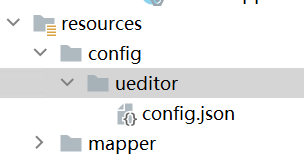 本文由 admin 创作,采用 知识共享署名4.0 国际许可协议进行许可。本站文章除注明转载/出处外,均为本站原创或翻译,转载前请务必署名。
