openwrt 安装的宝塔5.9 使用问题汇总 Published on Jul 10, 2023 in 随笔教程 with 0 comment openwrt 1.安装了redis 不能随启动自动启动 解决方案:找到 /www下的init.sh文件 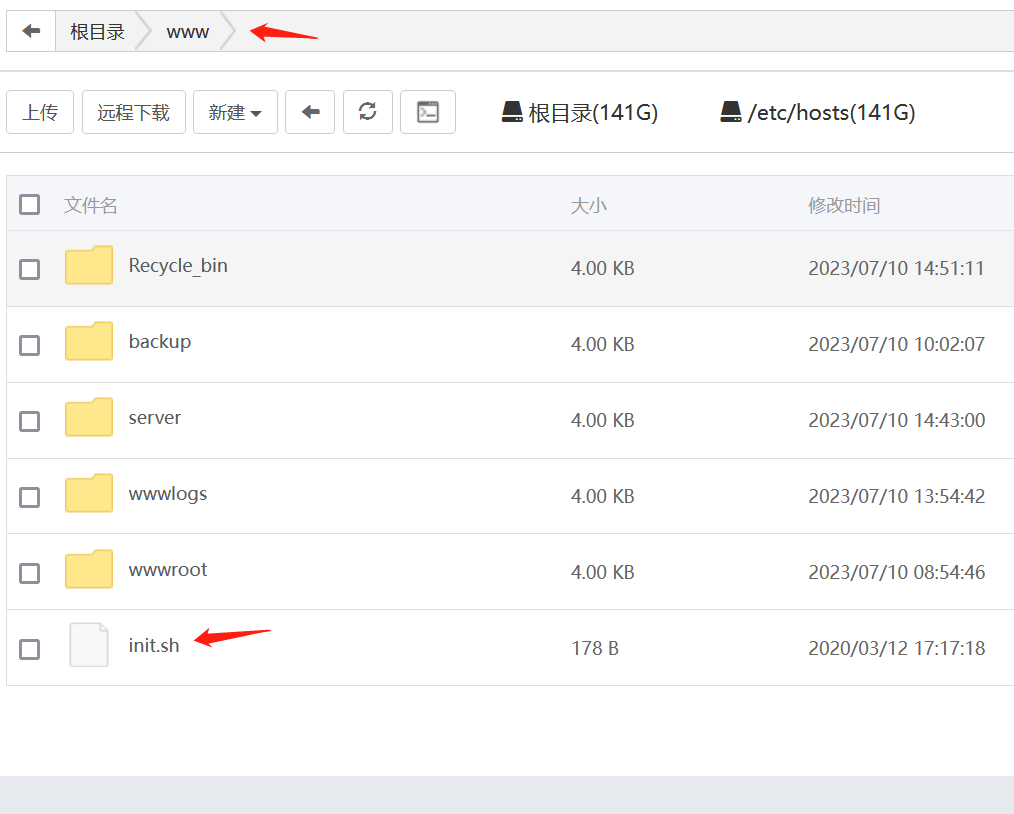 编辑文件添加 ```shell /etc/init.d/redis restart ``` 2.重装nginx会报错后启动nginx会报错  需要缺少两个模块重新编译安装 宝塔面板找到路径:/www/server/panel/install找到文件nginx.sh 打开开始编辑。大概在278行,我们添加 --add-module=srclib/ngx_devel_kit --add-module=srclib/lua_nginx_module 不会添加看代码,标注下划线的地方就是我们要添加的2个模块: ```shell ./configure --user=www --group=www --prefix=${Setup_Path} ${ENABLE_LUA} --add-module=/www/server/nginx/src/ngx_devel_kit --add-module=/www/server/nginx/src/lua_nginx_module --add-module=${Setup_Path}/src/ngx_cache_purge --add-module=${Setup_Path}/src/nginx-sticky-module --with-openssl=${Setup_Path}/src/openssl --with-pcre=pcre-${pcre_version} ${ENABLE_HTTP2} --with-http_stub_status_module --with-http_ssl_module --with-http_image_filter_module --with-http_gzip_static_module --with-http_gunzip_module --with-ipv6 --with-http_sub_module --with-http_flv_module --with-http_addition_module --with-http_realip_module --with-http_mp4_module --with-ld-opt="-Wl,-E" --with-cc-opt="-Wno-error" ${jemallocLD} ${ENABLE_WEBDAV} ${ENABLE_NGX_PAGESPEED} ${ADD_EXTENSION} ${i_make_args} ``` 4)因为默认是已经有这两个模块了,所以我们直接编译即可,我们回到ssh客户端使用命令开始编译,根据自己的版本,因为大鸟这台服务器安装的版本是nginx1.20.2所以用编译命令如下: ```shell sh /www/server/panel/install/nginx.sh install 1.20 ``` 5)编译完成后,用命令:```shell nginx -V ``` 即可查看到模块已经编译完成,注意这里的“v”是大写。 4、最后 这两个模块编译完成之后,我们再次安装宝塔防火墙以及网站监控报表后,即可正常使用。 本文由 admin 创作,采用 知识共享署名4.0 国际许可协议进行许可。本站文章除注明转载/出处外,均为本站原创或翻译,转载前请务必署名。
